






A product can be technically solid and still be difficult to use.
Users may get stuck during on-boarding. Navigation may feel unclear. Important actions can be easy to miss. Different screens may behave in different ways, which makes the product harder to learn.
These are not always development problems. Often, they are experience problems.
That is where UI/UX design services come in.
Good UI/UX work starts with understanding what users are trying to do, where they struggle, and how the product can make those tasks easier. The visual layer matters, but it comes after the product structure, user journeys and interaction logic are clear.
This guide explains what UI/UX services include, how the design process usually works, what deliverables businesses should expect, what influences cost, and how to evaluate a UI/UX agency before hiring one.
What Are UI/UX Design Services?
UI/UX design services cover the research, planning, interaction and interface work used to improve how people experience a digital product.
UX, or user experience design, focuses on how people move through a website, app or software platform. UI, or user interface design, focuses on how that experience is presented visually.
They are closely connected, but they are not the same thing.
UX Design Focuses on the User Journey
UX design is about helping users complete tasks without unnecessary confusion.
That can include research, information architecture, user flows, wire-frames, prototypes, usability testing and UX audits.
For example, imagine that users keep leaving halfway through account setup. A redesign of the colours or typography probably will not solve the real issue if the process asks for too much information too early.
A UX designer would look at the journey itself.
Could one step be removed? Are the instructions clear? Is the user being asked for information before they understand why it is needed?
Those are experience questions.
UI Design Focuses on the Interface
UI design deals with the part of the product that users see and interact with.
That includes layouts, typography, spacing, colours, buttons, forms, navigation elements, component states and responsive behaviour.
The aim is clarity and consistency.
A user should not have to stop and wonder whether two visually different buttons perform the same type of action. Similar interactions should feel familiar across the product.
A polished interface helps, but visual quality alone cannot fix a confusing workflow.
UI vs UX Design: What Is the Difference?
A practical way to understand the difference is:
UX design shapes the journey. UI design shapes the interface used to move through that journey.
| Area | UX Design | UI Design |
|---|---|---|
| Primary focus | User journey and usability | Interface and visual communication |
| Main question | Can users complete the task easily? | Is the interface clear and consistent? |
| Typical work | Research, flows, wireframes, testing | Layouts, components, visual states |
| Common outputs | User flows, wireframes, prototypes | High-fidelity screens, design systems |
The two areas work best together.
A checkout flow can be logically sound but still frustrating if error messages are unclear. On the other hand, an elegant interface cannot rescue a process that asks users to complete too many unnecessary steps.
That is why UI and UX are usually treated as connected parts of product design rather than isolated services.
What Do UI/UX Design Services Usually Include?
There is no fixed package that fits every product.
A new SaaS platform may need discovery, user flows and prototyping from the beginning. An existing mobile app may only need a UX audit and improvements to a few high-friction journeys.
The scope should follow the problem.
User Research and Product Discovery
Before designing anything, the team needs context.
Who will use the product? What are they trying to do? What does the business need the product to achieve? What problems are already known?
Depending on the project, discovery may involve stakeholder interviews, user conversations, product analytics, customer feedback, competitor reviews or existing business requirements.
Not every project needs a large research phase.
A small MVP and a mature enterprise platform do not require the same level of investigation. The useful question is whether the team has enough evidence to make important decisions without guessing.
Information Architecture and User Flows
Information architecture deals with how content and features are organised.
User flows show how people move from one step to another.
A straightforward e-commerce flow might look like:
Search → Product Page → Cart → Checkout → Payment
A B2B platform can be much more complex. Different users may have different permissions, approval levels or responsibilities.
Mapping this early helps expose missing steps, duplicated actions and confusing relationships before the team gets deep into visual design.
Wireframing and Prototyping
Wireframes help teams work on structure without being distracted by visual polish.
At this stage, the team can ask:
- Is the main action obvious?
- Is the information organised correctly?
- Does the user know what happens next?
- Is there an unnecessary step?
- Is anything missing?
A prototype adds interaction between screens.
That makes it easier to review the experience as a journey rather than as a collection of static layouts.
If a major flow needs to change, it is usually better to discover that before development starts.
User Interface Design
Once the structure is clearer, UI design turns it into a visual system.
This includes typography, spacing, hierarchy, components, colour, responsive layouts and interaction states.
A strong interface should help people recognise what matters without making them work for it.
The best UI often feels simple because the complexity has already been handled in the design decisions behind it.
Usability Testing and UX Audits
Not every product needs a complete redesign.
Sometimes the smarter move is to identify where users are struggling and improve those areas first.
A UX audit can look at navigation, forms, user flows, mobile behaviour, interface consistency and interaction patterns.
Testing can also show whether the team’s assumptions match what real users actually understand.
This is especially useful for products that have grown over time and accumulated different patterns across different sections.
Businesses that need support across research, wireframing, prototyping and interface design can review AmcoderZ’s UI/UX design services.
Design Systems and Developer Handoff
As products grow, inconsistency becomes expensive.
One screen may use one button style while another uses a different version for the same type of action. Forms may behave differently across modules. Developers may rebuild similar components several times.
A design system helps reduce that problem by defining reusable components, spacing rules, interaction states and visual patterns.
Developer handoff should also cover how components behave in real situations, not just how they look in a static design file.
That includes responsive behaviour, validation states, errors, loading states and edge cases.
What Does a Typical UI/UX Design Process Look Like?
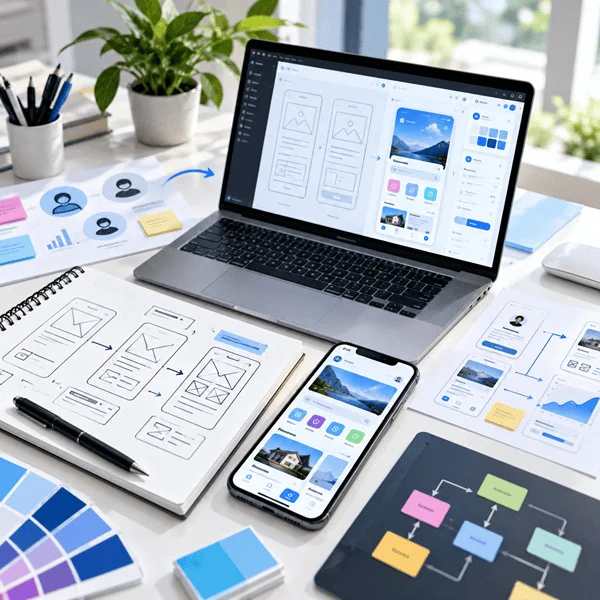
There is no single process that works for every project, but most UI/UX work follows a similar progression.
1. Define the Problem
The team first needs to understand what it is trying to improve.
Starting with “we need a new dashboard” is usually less useful than asking:
What does the user need to accomplish on this dashboard?
That shift changes the conversation from screens to outcomes.
2. Understand Users and Key Journeys
The team identifies the people using the product and the tasks that matter most.
For a SaaS product, that may include on-boarding, creating a workspace, inviting team members or completing a core task.
For a marketplace, it might be search, comparison, booking and payment.
3. Structure the Experience
User flows and information architecture define how those journeys connect.
This is where teams can identify dead ends, unnecessary steps or confusing dependencies.
4. Create Wireframes
Wireframes give the product structure.
They help stakeholders review hierarchy and flow before time is spent on detailed interface styling.
5. Design the Interface
Once the structure is stable, visual design can begin.
This is where the team defines typography, spacing, components, responsive layouts and interaction patterns.
6. Prototype and Review
Interactive prototypes help people experience the proposed journey before it is built.
This is useful for stakeholder reviews and, where appropriate, usability testing.
7. Prepare for Development
A product rarely exists only in its ideal state.
Real users see loading screens, empty states, errors, long content, small devices and unexpected inputs.
Those situations should be considered before development, not discovered afterward.
What Deliverables Should You Expect From a UI/UX Agency?
The right deliverables depend on what the project needs.
Possible outputs may include:
- Research summaries
- User flows
- Information architecture
- Wireframes
- Interactive prototypes
- High-fidelity UI screens
- Responsive layouts
- Component libraries
- Design systems
- Developer-ready files
- Interaction notes
A simple marketing website does not need the same level of documentation as a multi-role SaaS product.
Instead of asking only how many files or screens will be delivered, ask what each deliverable is meant to help you decide or build.
A good deliverable should reduce uncertainty.
How Much Do UI/UX Design Services Cost?
UI/UX design does not have one standard price because the work can vary dramatically from one product to another.
Two products may both have 20 screens and still require very different levels of design effort.
One may involve straightforward content pages. The other may include multiple user roles, complex permissions and several workflows that depend on each other.
Cost is usually affected by factors such as:
- Product complexity
- Number of important workflows
- Number of user roles
- Research requirements
- Existing product vs new build
- Web, mobile or multi-platform design
- Prototype depth
- Usability testing
- Design system requirements
- Developer handoff
- Project duration
Pricing models can also differ.
Some agencies work on fixed project scopes. Others use hourly billing, monthly retainers or a discovery phase before finalising the full scope.
If you are comparing proposals, do not look only at the number of screens.
Look at what problem is being solved and what level of work is required to solve it properly.
Accessibility Should Be Considered Early
Accessibility is easier to handle when it is part of the design process from the beginning.
Waiting until the end often leads to avoidable redesign work.
Depending on the product, designers may need to think about:
- Colour contrast
- Keyboard navigation
- Focus states
- Form labels
- Error messaging
- Text readability
- Touch-target size
- Interaction patterns that do not rely only on colour
These choices often improve usability for everyone.
For businesses serving users in the USA or UK, accessibility should also be reviewed against the requirements that apply to the product, industry and market.
When Does a Business Need UX Design Services?
UX support can be useful long before a product becomes “bad.”
Common signs include:
- Users drop out during on-boarding
- Navigation becomes harder as new features are added
- Customers repeatedly ask support how to complete basic tasks
- Mobile users struggle with flows built mainly for desktop
- Different product areas use different interaction patterns
- Developers need to guess how components should behave
- New features keep making the product more complicated
UX work can also be useful before launch.
For a new product, validating key workflows early can save development time later.
For an existing product, a focused review of one high-impact journey may be more valuable than redesigning everything at once.
How to Choose the Right UI/UX Design Agency
A strong portfolio is useful, but it should not be the only thing you evaluate.
Beautiful screens do not tell you how the team thinks.
Ask About the Problem Behind the Work
When reviewing a case study, ask what the team was trying to solve.
What was difficult about the product? What constraints existed? Why did the team choose one approach over another?
The reasoning matters.
Understand Their Research Approach
Ask how the team learns about users and existing product problems.
The answer does not need to include large research studies for every project, but it should show that decisions are based on more than preference.
Look at Relevant Product Experience
Experience in a similar industry can help, especially when the product has specialised workflows.
However, it should not be the only criterion.
A team that asks good questions and understands complex product logic may be more useful than one that has simply designed something visually similar.
Ask How Designers Work With Developers
A design can look complete in Figma and still create implementation problems.
Ask how the team handles responsive behaviour, component states, technical constraints and edge cases.
This is especially important for software products.
Ask How Decisions Are Validated
Useful questions include:
- How are important flows reviewed?
- When do you use prototypes?
- How is feedback handled?
- When is usability testing useful?
A good design partner should be able to explain both what they create and why they create it.
UI/UX Agency vs Freelancer vs In-House Designer
Each model can work well in the right situation.
| Option | Usually Best For | Main Consideration |
|---|---|---|
| Freelancer | Focused or clearly defined work | Capacity may depend on one person |
| UI/UX agency | Research, UX, UI and broader product work | Usually higher project cost |
| In-house designer | Ongoing product design | Long-term hiring and management |
A freelancer may be ideal for a specific feature or short-term requirement.
An agency can make more sense when a project needs different skills, research, prototyping and developer collaboration.
An in-house designer is often better when design is a continuous part of product development.
The right answer depends on the product, team, budget and amount of ongoing work.
Why UI/UX Design and Development Should Work Together
Design and engineering are not separate worlds.
A design decision can affect development effort. A technical limitation can affect the user experience.
Consider a simple screen.
What happens when there is no data?
What does the user see while content is loading?
How should an error appear?
What happens on a smaller device?
Can the component be reused elsewhere?
If those questions are left until development, the team may end up making product decisions under pressure.
When design needs to move directly into engineering, working with a capable custom software development company can reduce gaps between the intended experience and final implementation.
What Should US and UK Businesses Consider When Choosing a UI/UX Partner?
For remote design work, location is only one part of the decision.
US and UK businesses should also look at communication structure.
Before starting a project, clarify:
- Working-hour overlap
- Meeting frequency
- Feedback timelines
- Project ownership
- Documentation
- Developer handoff
- Accessibility expectations
- Technical constraints
A remote partnership does not require both teams to work the same hours.
It needs clear responsibilities and enough overlap to make decisions without unnecessary delays.
Questions to Ask Before Hiring a UI/UX Design Company
Before choosing a partner, ask questions that reveal how the team works:
- How do you understand users before detailed design starts?
- How do you validate important user flows?
- Who will work directly on the project?
- How do designers and developers collaborate?
- Will reusable components or a design system be included if needed?
- How do you handle responsive behaviour?
- What happens if usability issues appear during review or testing?
- What support is available during development?
Good answers should be specific.
Vague statements about “creating amazing experiences” are less useful than a clear explanation of the process.
Frequently Asked Questions
What is the difference between UX design services and UX consulting services?
UX design services usually involve hands-on work such as user flows, wire-frames, prototypes and interface improvements. UX consulting is often more advisory and may focus on audits, strategy, research findings or recommendations for an internal product team.
How long does a UI/UX design project take?
The timeline depends on product complexity, research needs, important workflows, feedback cycles and testing. A focused feature redesign can be much shorter than planning a new multi-role software platform.
Can UI/UX design improve an existing product?
Yes. Existing products can be reviewed for problems in navigation, forms, user flows, mobile behaviour and interface consistency. A full redesign is not always necessary. Improving a few important journeys may have more value.
What should a business prepare before starting a UI/UX project?
Useful inputs include product goals, target users, customer feedback, analytics, known usability issues, business requirements and technical constraints. The design team should help define the right structure rather than expecting every screen to be planned in advance.
Final Takeaway
Good UI/UX design is not about making screens look more modern.
It is about helping people understand the product, complete tasks with less friction and move through the experience with confidence.
When choosing a design partner, look at how the team understands users, handles complex workflows, validates decisions, considers accessibility and works with developers.
If you are planning a new product or improving an existing one, you can learn more about AmcoderZ’s UX design services.
About AmcoderZ
AmcoderZ is a software development company founded in 2014, offering UI/UX design, mobile app development, web development, custom software, healthcare software, and BLE/IoT development services.
With a team of 25+ engineers and experience delivering 150+ projects, AmcoderZ works with businesses across markets including the United States, United Kingdom, Australia, and UAE.
Its UI/UX work focuses on creating clear user journeys, practical interface systems, prototypes, and development-ready designs that connect product goals with real implementation requirements.
Businesses planning a new digital product or improving an existing one can explore AmcoderZ’s UI/UX Design Services.
